Report an Instagram account: what disable, delete and ban actually mean
To report an Instagram account, open its profile, tap the three-dot menu and choose Report, then select the exact rule it breaks. Instagram weighs the violation, not the report count. "Disable" is the slippery word here: it can mean switching off your own account, or Instagram removing a rule-breaker.
One word causes most of the confusion around this topic. "Disable an Instagram account" can describe three completely separate things, and people searching the phrase usually mean different ones. Before you follow any steps, work out which of these you are actually trying to do, because the route changes entirely.
What does it mean to disable an Instagram account?
Disabling means an account stops being visible and usable, but who flips that switch decides everything. There are three versions worth keeping apart. First, you deactivate your own account, a reversible pause that hides your profile until you sign back in. Second, you delete your own account, which is permanent once a grace period lapses. Third, Instagram disables a rule-breaker, an enforcement decision triggered by a report and a guideline breach, not by you choosing a setting.
That third sense is the one people mean when they want a fake, scam or harassing profile gone. You cannot disable someone else's account yourself; you report it, and a reviewer decides. The sections below split along exactly those lines, so jump to the one that matches your goal. If you would rather hand a genuine violation to a specialist, our Instagram reporting service only ever files through official channels.
How do you report an Instagram account, post or business page?
Report the precise thing that breaks the rules, using the Report button attached to it. Whether you flag the whole profile or one item depends on where the harm lives, so pick the smallest accurate target. Here is the order that works:
- Open the offending surface. Go to the profile, the specific post or reel, or the individual comment that crosses the line.
- Tap the three-dot menu (⋯). On a profile it sits top right; on a post it sits above the image; for a comment, press and hold it instead.
- Choose Report and name the breach. Pick the closest category — scam, hate speech, bullying, fake account, sale of restricted goods — since that label routes your report to the right reviewer.
- Add detail if prompted. A short note and the profile URL give the reviewer context the dropdown alone cannot.
A quick wording point: Instagram has profiles and business or professional accounts, not Facebook-style "Pages", so reporting a "page" really means reporting that business profile through the same three-dot menu. Instagram's own steps sit in its Help Center guide to reporting a post or profile. For a single Story, DM or grid post, the per-surface walkthrough in reporting a Story or post shows where each Report button hides.
How do you report a fake or impersonation Instagram account?
A fake or impersonation Instagram account has its own dedicated form, separate from the in-app Report button. When a profile pretends to be you, your brand or someone you legally represent, file through Instagram's impersonation report form. Instagram only acts on impersonation flagged by the person being copied or an authorised representative, and it asks for a photo of government-issued ID to confirm identity.
Category accuracy is what gets these moving, and the scale is why precision matters. Instagram crossed 3 billion monthly active users in September 2025, and Meta actioned roughly 1.4 billion fake accounts in Q4 2024 alone, per the Meta Transparency Center. At that volume, an automated triage layer leans heavily on the category you pick, so logging a clone as plain "spam", or a scam shop as generic "I don't like this", is a common reason a sound report stalls. If the impostor is squatting on your handle, the reclaim path runs through getting a stolen username back; if it is lifting your photos and posing as your brand, removing a cloned profile covers the copyright angle.
How many reports does it take to disable an account?
There is no threshold, and this single fact dismantles most of the myths online. Instagram's Help Center states plainly that "the number of times something is reported doesn't determine whether or not it's removed" — what matters is whether the content actually breaks a rule (Instagram Help Center). One precise, evidenced report can take down a clearly violating account; a thousand empty ones take down nothing.
Account history quietly tilts the odds too. Instagram weighs an account's age, its record of prior violations and its normal behaviour, so an established profile with a clean history is far harder to action than a brand-new one — the same report lands differently depending on who it targets. That is another way of saying severity and evidence drive removals, not volume: a credible flag against a fresh scam account outpunches a hundred against a long-standing one.
So volume-based tools fail by design. A coordinated mass report, an automated report bot, or any "report tool" that promises speed through numbers runs into the same wall: Instagram discounts duplicate and coordinated flags, and a pile-on can mark you, the reporter, as the bad actor. Worse, many of these tools harvest the login you hand them. The reliable lever is sharpness, not loudness — the right category, a dated screenshot, the profile URL, and a one-line note on the pattern.
Does Instagram tell someone you reported them?
No, and that anonymity rarely wavers. When you report a profile, post or comment, Instagram never reveals your name to the account holder, even after it takes action. The reviewer sees the report; the reported person does not see you. This is why retaliation fears about flagging a harasser or a scam shop are mostly unfounded.
The lone exception is an intellectual-property claim. File a copyright or trademark notice and your name and contact details may be shared with the other party, because the law gives them a right to respond or counter-notify. That trade-off is the cost of a formal legal route rather than a Community Guidelines report. If a stalker rather than a scammer is the problem, the safety-first steps in reporting a stalker walk through locking the account down before and after you file.
How do you deactivate or delete your own Instagram account?
To switch off your own account you change a setting; you do not report anything. Instagram gives you two doors under Settings → Accounts Center → "Account ownership and control", and the difference is whether the account can return. Deactivate hides your profile, posts and likes until you log in again. Delete removes it permanently after a 30-day grace window. Instagram's page on how to delete or deactivate your account walks each step.
The table sorts the three states people muddle, including being disabled by Instagram rather than by choice.
| State | Who does it | Reversible? | How to undo |
|---|---|---|---|
| Deactivate (temporary) | You | Yes, any time | Log back in; everything reappears |
| Delete (permanent) | You | Only within 30 days | Log in inside the grace window to cancel |
| Disabled by Instagram | Sometimes, by appeal | Request a review of the decision |
Two practical limits catch people out. You can only deactivate an account about once a week, so it is not a switch you can flip on and off freely. And because a delete erases everything once the grace period lapses, request a copy of your data first through "Download Your Information" — Meta can take up to 30 days to compile that archive, so start it well before you intend to delete.
Locked out of an old account you want to delete? Reset the password by SMS or email first, or sign in through a linked Facebook account; if every login method is gone, use Instagram's account-recovery support to prove ownership before you can remove it for good.
How do you recover a disabled Instagram account?
The recovery route depends on which kind of "disabled" you face. If you deleted your own account, logging in within the 30-day grace period reverses it; after that it is permanently erased. If you merely deactivated, a single sign-in restores everything. The hard case is an account Instagram disabled for a suspected violation.
For an enforcement disable, the 2026 flow is concrete. On the disabled-account notice, tap "Learn More" then "Request Review" (older screens read "Disagree with Decision"), and submit your username, full name and the email or phone on the account. If Instagram needs to confirm a real person owns it, it asks for a selfie holding a handwritten confirmation code it supplies on screen — a video selfie or a photo of you holding that code, not a copy of a passport. Meta now routes much of this through its in-app AI support assistant and the about disabled accounts page; for hacked-then-disabled cases the cross-app Meta Account Recovery Hub handles Facebook, Instagram and Threads together. Timelines vary with the case: simple, clearly mistaken disables often clear in 24–48 hours, most appeals resolve in 3–7 days, and complex or permanent-violation reviews can take up to about two weeks.
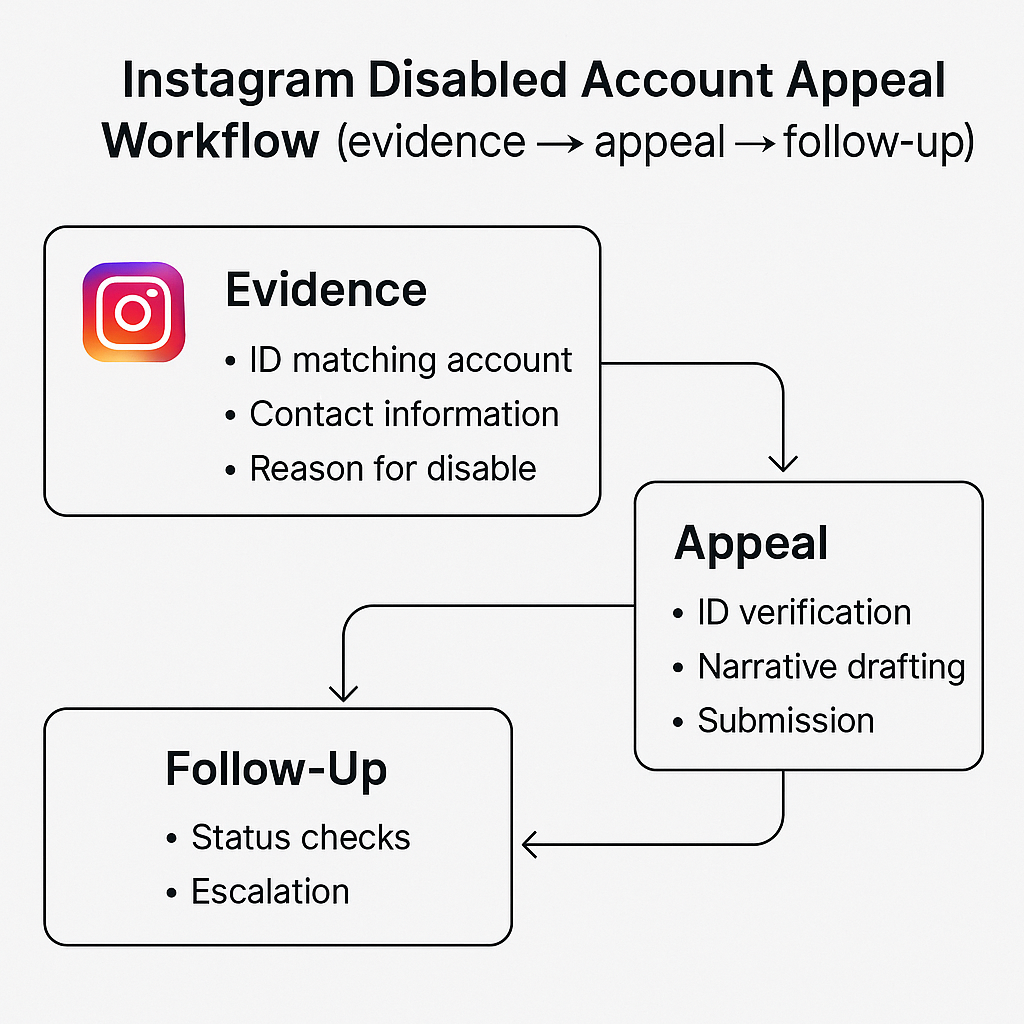
Submit the appeal once and let it run. A handful of avoidable mistakes are what actually drag a recovery out:
- Sending duplicate or repeated appeals. Each new submission pushes you to the back of the queue instead of bumping you up it.
- Writing an emotional or accusatory message. A calm, factual one-paragraph explanation reads better to a reviewer than an angry one.
- Opening a new account while the appeal is pending. A second profile can read as ban evasion and harm the case you are making.
- Leaving an outdated email or phone on file. If Instagram cannot reach you with the code or the result, the review simply stalls.
When does a reported Instagram account become a police matter?
Escalate to law enforcement the moment the behaviour stops being a rules problem and becomes a crime: fraud that cost you money, sextortion, credible threats, stalking, or anything involving a minor. A platform report and a police report are not substitutes; run both at once. Instagram can remove the account, but only the authorities can pursue the person.
Use your country's official channel. In the United States that is the FBI's Internet Crime Complaint Center (IC3); in the United Kingdom, Action Fraud; in India, the National Cyber Crime Reporting Portal and its 1930 helpline. Build the evidence first: screenshots showing the @username and profile URL, the dated messages, and an archived copy of the page before it disappears. For a non-consensual intimate image, the free hash-matching tool at StopNCII.org blocks the image across partner platforms. Reporting extortion has its own playbook in handling Instagram extortion.
Sources and official reporting links
Each step above traces to a primary source — Instagram's Help Center, Meta's filings and the national bodies you would escalate a real crime to:
- Instagram Help Center — report a post or profile and the impersonation report form.
- Instagram Help Center — why report counts don't decide removals, and about disabled accounts.
- Instagram Help Center — delete or deactivate your own account (the 30-day window).
- Scale of the platform — Instagram's 3 billion monthly users (CNBC, Sept 2025) and the Meta Transparency Center on ~1.4 billion fake accounts actioned in Q4 2024.
- Report a crime — IC3 (US), Action Fraud (UK), India's cyber crime portal, and StopNCII.org.
Unsure whether a profile is a genuine violation, a quick self-fix, or a case for an honest ban-as-a-service to carry through official channels? Tell us about the account and we will say so plainly.
FAQ
What is the difference between disabling and deleting an Instagram account?
Deactivating disables an account temporarily and hides everything until you log back in. Deleting removes it permanently after a 30-day grace period. When Instagram disables an account, that is an enforcement action against rule-breaking, and it can sometimes be appealed. Same word, three very different outcomes.
Can the person see that I reported their Instagram account?
No. Reports on Instagram are anonymous and the account holder is never shown who flagged them. The single exception is a copyright or trademark claim, where your name and contact details may be passed to the other party so they can respond or counter-notify.
How long does Instagram take to review a reported account?
There is no fixed timetable. Clear-cut breaches like spam or nudity are often actioned within a day or two, while context-heavy cases such as harassment or impersonation can take longer because a human reviewer checks them. You can monitor progress under Settings, Help, Support Requests.
What do I do if Instagram disabled my account by mistake?
Open the app or login page and look for a Request Review or Disagree with Decision prompt. Confirm your identity, give a short factual explanation, and submit once. Avoid sending repeat appeals, since duplicates push you back in the queue rather than speeding anything up.
Does reporting an account more times make Instagram act faster?
No. Instagram's Help Center states the number of reports does not determine whether something is removed. Coordinated mass-reporting is detected and discounted, and a false pile-on can flag you as the abuser. One accurate, evidenced report carries more weight than hundreds of vague ones.
Can a permanently deleted Instagram account be recovered?
Only inside the 30-day window. Deleting an account starts a 30-day countdown during which logging back in cancels it and restores everything. Once those 30 days pass, the account, photos, followers and messages are erased for good and cannot be retrieved by you or Instagram.
How long does it take to recover a disabled Instagram account?
It depends on the case. Simple, clearly mistaken disables often clear in 24 to 48 hours, most appeals resolve in three to seven days, and complex or permanent-violation reviews can take up to about two weeks. Submit one factual appeal and wait; duplicate appeals reset your place in the queue.
Does Instagram warn you before disabling an account?
Usually, yes. Enforcement is normally graduated: a warning first, then a feature restriction or temporary suspension, and only then a full disable for serious or repeated violations. Severe breaches such as child safety or terrorism can skip the ladder and trigger an immediate disable with no prior warning.
Can I report an Instagram account if I don't have an account?
Yes. You can use Instagram's web report and impersonation forms while logged out, so you do not need your own Instagram account to flag a scam, a clone or an abusive profile. The in-app three-dot Report button, however, is only available once you are signed in.